ROS2-based Framework
Challenges
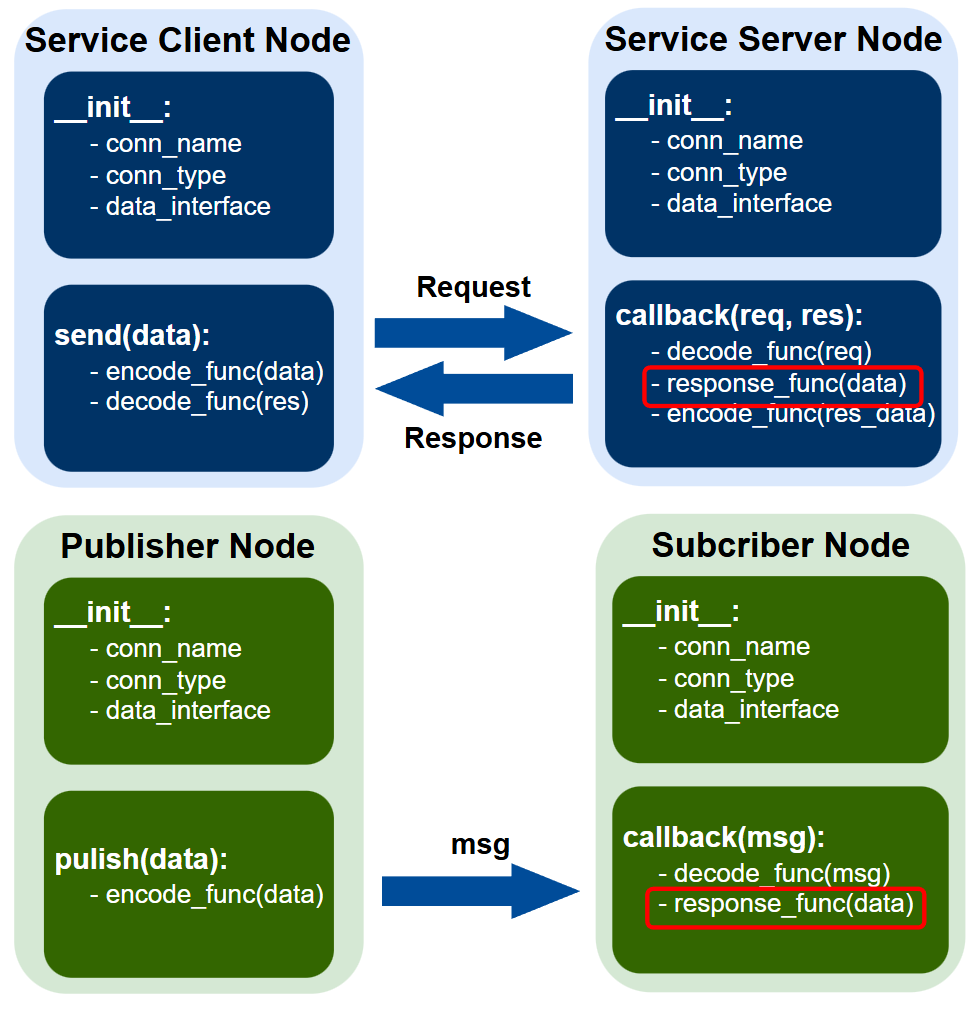
Single Node: One Specific Task with Tightly Coupled, Customized Interface
Works well in isolation but is rigid and non-reusable.
Time-consuming due to repeated, low-value work:
Customizing data interfaces
Declaring connections
Implementing encode/decode functions
Developer should focus solely on the core response function
Customize interfaces
Step 1. Create interface folder in ros2_ws/src
ros2 pkg create --build-type ament_cmake --license Apache-2.0 tutorial_interfaces
Step 2. Create msg, srv folder in ros2_ws/src/tutorial_interfaces
mkdir msg srv
Step 3. Make new file
Num.msg in ros2_ws/src/tutorial_interfaces/msg
int64 num
AddThreeInts.srv in ros2/src/tutorial_interfaces/srv
int64 a
int64 b
int64 c
---
int64 sum
Step 4. Change CMakeLists.txt
find_package(geometry_msgs REQUIRED)
find_package(rosidl_default_generators REQUIRED)

rosidl_generate_interfaces(${PROJECT_NAME}
"msg/Num.msg"
"srv/AddThreeInts.srv"
DEPENDENCIES geometry_msgs # Add packages that above messages depend on, in this case geometry_msgs for Sphere.msg
)
Step 5. Change package.xml
<depend>geometry_msgs</depend>
<buildtool_depend>rosidl_default_generators</buildtool_depend>
<exec_depend>rosidl_default_runtime</exec_depend>
<member_of_group>rosidl_interface_packages</member_of_group>
Step 6. Build interface
colcon build --packages-select tutorial_interfaces
source install/setup.bash
Implement Node
Step 1. Define and run server node
from tutorial_interfaces.srv import AddThreeInts                                                           # CHANGE

import rclpy
from rclpy.node import Node


class MinimalService(Node):

def __init__(self):
       super().__init__('minimal_service')

       # Declare connection and data interface
       self.srv = self.create_service(AddThreeInts, 'add_three_ints', self.add_three_ints_callback)       # CHANGE

def add_three_ints_callback(self, request, response):
       response.sum = request.a + request.b + request.c                                                   # CHANGE
       self.get_logger().info('Incoming request\na: %d b: %d c: %d' % (request.a, request.b, request.c))  # CHANGE

       return response

def add_three_ints_callback_rewrite(self, request, response):
       # Decode
       data = {'a': request.a, 'b': request.b, 'c': request.c}

       # Response
       res_data = data['a'] + data['b'] + data['c']

       # Encode
       response.sum = res_data
       return response
Step 2. Run clients
from tutorial_interfaces.srv import AddThreeInts                            # CHANGE
import sys
import rclpy
from rclpy.node import Node


class MinimalClientAsync(Node):

def __init__(self):
       super().__init__('minimal_client_async')

       # Declare connection and data interface
       self.cli = self.create_client(AddThreeInts, 'add_three_ints')       # CHANGE
       while not self.cli.wait_for_service(timeout_sec=1.0):
       self.get_logger().info('service not available, waiting again...')
       self.data_interface = AddThreeInts
       self.request = self.data_interface.Request()

def send(self, data):
       # encode
       self.request.a = data['a']
       self.request.b = data['b']
       self.request.c = data['c']
       future = self.cli.call_async(self.req)

       while rclpy.ok() and not future.done() and wait_until_done:
              time.sleep(0.1)
       res = future.result()

       # decode
       rev_data = {'sum': res.sum}
       return rev_data
Multitask: Hard, Even Impossible
Multiple tasks within one node
quickly results in bloated, hard-to-maintain code
manually manage numerous subscribers, publishers, actions, services, and timers, each with different APIs and callback signatures
Coordination across multiple tasks (e.g., perception, planning, control, diagnostics)
forced to split logic across multiple nodes, introducing complex inter-node communication
synchronization issues, lifecycle management overhead, and debugging difficulties
Key Advantages of Custom ROS2 Node
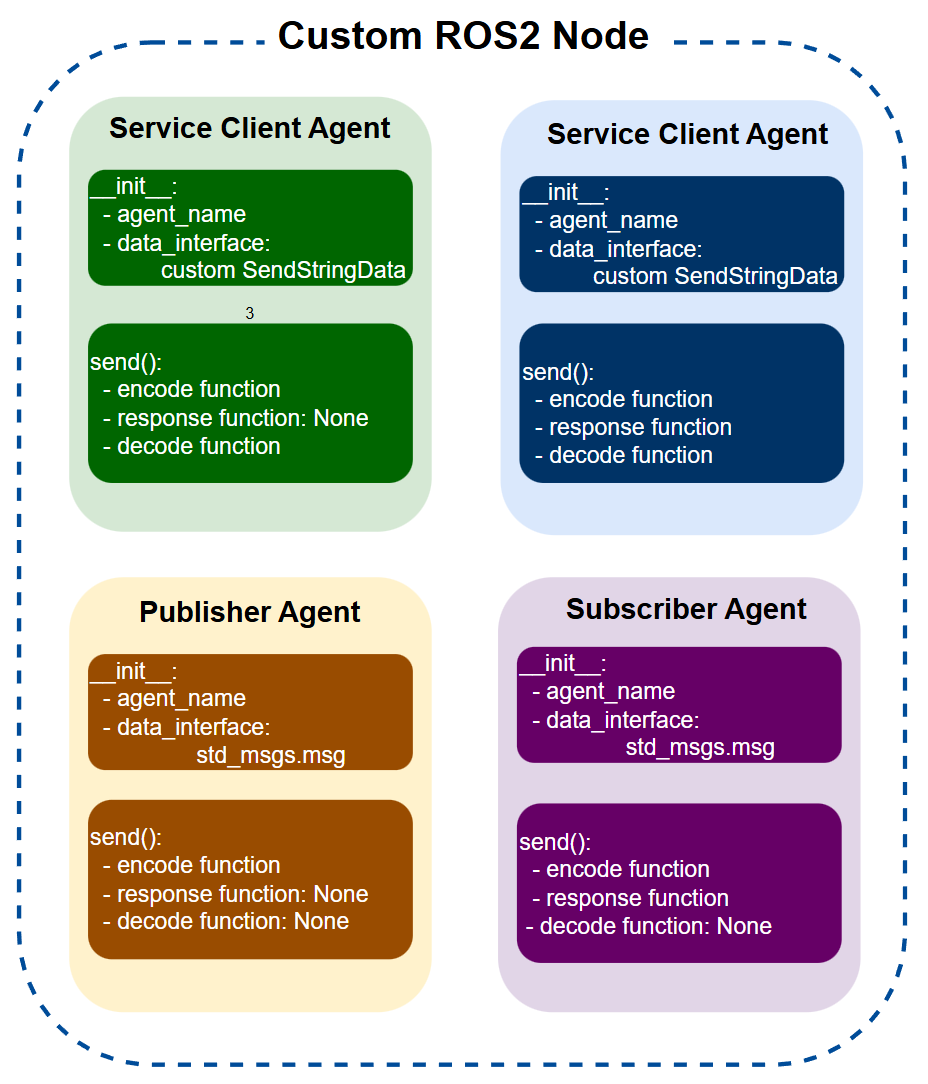
This lightweight framework wraps vanilla ROS2 (rclpy) with a clean agent-based design. Instead of writing repetitive boilerplate for every subscriber, publisher, action, or service, you:
Add agents with one line of code
Use the same simple API (agent.send(), agent.get()) for all communication types
Keep your business logic clean (no ROS messages inside your functions)
Get automatic logging, connection waiting, and multi-threaded execution
Feature |
Vanilla ROS2 |
This Custom Framework |
|---|---|---|
Code length |
Lots of boilerplate |
Very concise |
Interface consistency |
Different syntax per type |
Uniform: send() / get() everywhere |
Data handling |
Manual encode/decode everywhere |
One encode_func + decode_func per agent |
Business logic |
Mixed with ROS calls |
Pure Python in response_func |
Managing 20+ interfaces |
Messy node class |
Clean node.agents dictionary |
Logging & debugging |
Manual or external tools |
Built-in: JSON + images + periodic sub logging |
Waiting for connections |
You write it |
One call: node.wait_until_connected() |
Concurrency |
Manual executor + callback groups |
Smart defaults for images & high-rate topics |
Perfect for:
Robots with many sensors/actuators
Teams that want fast prototyping
Projects needing easy debugging & data recording
Overview of the Custom ROS2 Node Implementation
This Python code provides a highly modular and extensible framework for building custom ROS2 nodes, centered on the base class NodeAgent and the managing class CustomNode. It abstracts ROS2 communication primitives — topics, actions, services, and timers — into reusable “agents” that are easily configured and combined to handle complex robotic or distributed systems. The key advantage of this design lies in its strict separation of concerns: callbacks and send operations no longer contain fragmented, repetitive ROS2 message handling code. Instead, all low-level details are cleanly split into three dedicated components:
encode_func: Converts pure Python data (e.g., dicts, NumPy arrays) into ROS2 message fields before sending or publishing.
decode_func: Transforms incoming ROS2 messages back into clean, easy-to-use Python data structures.
response_func (or run_func): Contains only the core business logic or processing, operating exclusively on pure Python data with no direct contact with ROS2 message objects.
This clear separation keeps callbacks and send functions short, readable, and focused solely on orchestration, while the actual data conversion and processing logic lives in reusable, testable pure-Python functions. Combined with ROS2’s rclpy library, the framework adds powerful layers for data encoding/decoding, comprehensive logging, robust error handling, and intelligent concurrency management. Agents inherit from NodeAgent and are aggregated in a CustomNode, which manages spinning, callback execution, and lifecycle. Key features include:
Uniform Interface: All agents expose the same simple get(), send(), and log_msg() methods, regardless of whether they are subscribers, publishers, actions, services, or timers.
Clean Data Handling: Customizable encode_func and decode_func enable seamless use of native Python formats (JSON, NumPy, OpenCV images).
Built-in Logging & Debugging: Automatic saving of messages, images, and arrays to timestamped directories, plus optional periodic logging of all subscribers.
Smart Concurrency: Multi-threaded executors and callback groups automatically applied, especially for high-rate image topics.
Easy Extensibility: Factory function make_agent() and AGENT_CLASS_DICT simplify adding new agent types or integrating non-ROS protocols (e.g., TCP/IP).
This implementation is especially well-suited for robotics, AI, and IoT applications using ROS2, where nodes must reliably coordinate numerous sensors, actuators, and sophisticated processing pipelines while remaining maintainable and debuggable.
Detailed Breakdown of Components
Base Class: NodeAgent
Purpose: Serves as the foundation for all agent types, providing shared functionality for initialization, logging, data formatting, and basic send/receive operations. Key Methods:
__init__(): Sets up agent properties like name, connection type (e.g., ‘sub’ for subscriber, ‘action_server’), data interface (ROS2 message type), and custom functions for encoding/decoding/response processing. It also tracks connection status and logging flags.
make_log_dirs(): Creates timestamped directories for logs (messages in JSON, images/arrays in PNG/NPY). If is_init is True, it starts a new session; otherwise, it reuses the latest one.
log_msg(): Saves data to files, handling JSON-serializable dicts, NumPy arrays (as images or .npy files), and threading for non-blocking I/O. Useful for auditing complex interactions.
reform_response(): Ensures responses include an ‘isdone’ flag for consistent completion signaling.
get(): Retrieves data from subscribers or triggers sends for clients. Includes optional info printing for debugging.
send(): Abstract method overridden in subclasses for type-specific sending.
Advantages: By abstracting common operations, it reduces boilerplate code when dealing with diverse ROS2 interfaces.
Derived Agent Classes
These inherit from NodeAgent and implement specific ROS2 behaviors:
ActionServerAgent:
Handles action goals via callback(), decoding requests, processing with response_func, and sending feedback/results.
Uses threading for continuous feedback during long-running tasks.
Error handling ensures graceful aborts with error messages.
ActionClientAgent:
send() encodes and sends goals, waits for results (with optional timeout), and decodes responses.
Callbacks for feedback, goal acceptance, and results provide fine-grained control.
TopicAgent:
callback() decodes incoming messages and applies response_func.
send() and publish() encode and publish data, with support for periodic publishing via timers. Tracks first-message receipt to confirm connections.
ServiceServerAgent:
callback() decodes requests, processes them, and encodes responses.
ServiceClientAgent:
send() encodes requests, calls the service asynchronously, and decodes results. Supports non-blocking mode and timing info for performance analysis.
TimerAgent:
callback() simply invokes response_func at intervals, ideal for periodic tasks without external triggers.
AGENT_CLASS_DICT: A mapping from connection types (strings like ‘action_server’) to classes, enabling dynamic agent creation.
Factory Function: make_agent()
Takes a CustomNode and config dict (e.g., conn_type, data_interface, encode/decode funcs). Instantiates the appropriate agent class, attaches it to the node (e.g., creating subscriptions, publishers, or timers). Handles special cases like image sensors with reentrant callback groups for better concurrency. Supports integration with non-ROS protocols (e.g., TCP/IP) via conditional branching. Output: Prints confirmation messages for easy debugging.
Managing Class: CustomNode (Inherits from rclpy.node.Node)
Purpose: Acts as a container for multiple agents, managing their lifecycle and execution.
Key Methods:
__init__(): Initializes node name, logging setup, and shared callback groups. Optional stop_func for cleanup on shutdown.
add_agent(): Configures and adds a single agent, handling name resolution and optional TCP/IP fallback.
add_agents(): Batch-adds agents from a list of configs, with shared kwargs for consistency.
listen() / spin(): Starts callback processing, optionally in a thread. Uses MultiThreadedExecutor if multiple callback groups are needed (e.g., for high-concurrency setups).
wait_until_connected(): Blocks until all subs/clients are connected, ensuring readiness in distributed systems.
start_log_subs(): Periodically logs all subscriber data (e.g., at 10 FPS) to a timestamped directory, handling arrays/images separately for efficiency.
stop_log_subs(): Halts logging thread safely.
is_logging_subs: Property to check logging status.
Agent Storage: Agents are stored in a dict by name for easy access (e.g., node.agents[‘my_sub’].get()).
Advantages in Flexibility and Handling Complex Workflows
This implementation shines in its flexibility, allowing developers to mix and match ROS2 primitives without rewriting core logic:
Modular Configuration: Agents are defined via simple dicts (e.g., in add_agents()), specifying conn_type, data_interface, and custom funcs. This decouples business logic (response_func) from communication details, enabling rapid prototyping. For instance, swapping a topic for an action requires only changing conn_type—no code restructuring.
Custom Data Pipelines: Encode/decode funcs support arbitrary data (e.g., converting dicts to ROS messages, handling images with CvBridge). This integrates seamlessly with libraries like NumPy, OpenCV, or even external APIs, making it adaptable to non-standard ROS workflows.
Extensibility: Inheritance from NodeAgent allows custom subclasses for niche needs (e.g., adding encryption). The factory pattern and AGENT_CLASS_DICT facilitate adding new types without modifying core code.
Concurrency and Performance: Multi-threaded executors and reentrant groups prevent bottlenecks in image-heavy or multi-agent nodes. Timers enable scheduled tasks, while async sends in clients support non-blocking operations.
For complex workflows involving many agents (e.g., a robot with dozens of sensors, controllers, and AI modules):
Scalability: A single CustomNode can manage 100+ agents, each handling a specific role (e.g., 10 subs for sensors, 5 action clients for actuators, 3 timers for health checks). add_agents() batch-adds them from configs, ideal for large systems.
Orchestration: Agents interact via shared node methods (e.g., one agent’s response_func can trigger another’s send()). This enables intricate pipelines, like a subscriber triggering an action server, which logs results and publishes updates.
Debugging in Complexity: Logging (messages, images, periodic subs) captures state in timestamped dirs, crucial for diagnosing issues in multi-agent setups. Error decorators (@exception_handler) and feedback loops ensure robustness.
Distributed Systems: Waiting for connections and handling timeouts make it reliable for fleets of nodes. For example, in a swarm robotics scenario, one node could coordinate 50+ agents for perception, planning, and execution, with logging for post-analysis.
Real-World Example: Imagine a autonomous vehicle node: Subs for camera/LiDAR, action servers for navigation commands, services for diagnostics, timers for heartbeat signals. This framework allows implementing such a “very complicated work” by composing agents, reducing development time and errors compared to vanilla ROS2.
In summary, this code transforms ROS2 node development into a composable, agent-based paradigm, offering unparalleled flexibility for simple scripts or massive, multi-node ecosystems. It minimizes glue code, enhances maintainability, and scales effortlessly to demanding applications.
Quick Start
This custom framework makes building ROS2 nodes much simpler and more powerful than vanilla ROS2. You create one CustomNode, then add “agents” for topics, actions, services, or timers — all with a clean, uniform interface.
Basic Setup
from pyconnect.ros.custom_node import CustomNode
node = CustomNode(name='my_robot_node')
Add Agents
Subscriber (receive data from a topic)
node.add_agent(
       conn_name='camera_image',      # topic name
       conn_type='sub',               # subscriber
       data_interface=Image,          # your ROS message type, e.g. from sensor_msgs.msg import Image
       decode_func=my_image_decoder,  # function: ROS msg → Python dict
       response_func=my_image_processor,  # optional: called every time a message arrives
       do_log_msg=True                # optional: auto-save images + data to disk
)
Publisher (send data to a topic)
node.add_agent(
       conn_name='command',
       conn_type='pub',
       data_interface=String,
       encode_func=my_string_encoder,  # function: Python dict → ROS msg
       time_period=0.5                 # optional: auto-publish every 0.5 sec
)
Action Client (call a long-running action)
node.add_agent(
       conn_name='navigate',
       conn_type='action_client',
       data_interface=NavigateAction,   # your custom action type
       encode_func=my_goal_encoder,
       decode_func=my_result_decoder
)
Action Server (provide a service that can give feedback)
node.add_agent(
       conn_name='process_data',
       conn_type='action_server',
       data_interface=ProcessAction,
       encode_func=my_result_encoder,
       decode_func=my_goal_decoder,
       response_func=my_long_task        # your main processing function
)
Service Client
node.add_agent(
       conn_name='get_map',
       conn_type='service_client',
       data_interface=GetMap
)
Timer (run something periodically)
node.add_agent(
       conn_name='heartbeat',
       conn_type='timer',
       time_period=1.0,                 # every 1 second
       response_func=my_health_check
)
Use the Agents (Super Simple API)
# Get latest data from a subscriber
latest_image_data = node.agents['camera_image'].get()   # returns decoded Python dict

# Or with info print
latest_image_data = node.agents['camera_image'].get(show_info=True)

# Send/publish data
node.agents['command'].send({'cmd': 'forward', 'speed': 0.5})

# Call an action
result = node.agents['navigate'].send({'goal_x': 10.0, 'goal_y': 5.0})

# Call a service
map_data = node.agents['get_map'].send({'request_full': True})
Run the Node
# Option A: Run in background thread (good for scripts)
node.spin(run_thread=True)

# Option B: Block main thread (good for simple programs)
node.spin()  # or node.listen()
Useful Extras
# Wait until all sensors/services are connected
node.wait_until_connected()

# Log all incoming subscriber data (images, arrays, etc.) at 10 FPS
node.start_log_subs(fps=10)
# ... later
node.stop_log_subs()
Full Minimal Example (Publisher + Subscriber)
from std_msgs.msg import String
from pyconnect.utils import dict2str, str2dict

def encoder(data, msg):
msg.data = dict2str(data)
return msg

def decoder(msg):
return str2dict(msg.data)

# Publisher node
pub_node = CustomNode('talker')
pub_node.add_agent(conn_name='chatter', conn_type='pub', data_interface=String,
              encode_func=encoder, time_period=1.0)  # sends every second
pub_node.spin(run_thread=True)

# Subscriber node
sub_node = CustomNode('listener')
sub_node.add_agent(conn_name='chatter', conn_type='sub', data_interface=String,
              decode_func=decoder, do_log_msg=True)
sub_node.spin()